
Introduction
Starting print-on-demand can feel confusing because there are so many tools, platforms, apps, and paid services being recommended online.
But most beginners do not need a huge software stack right away.
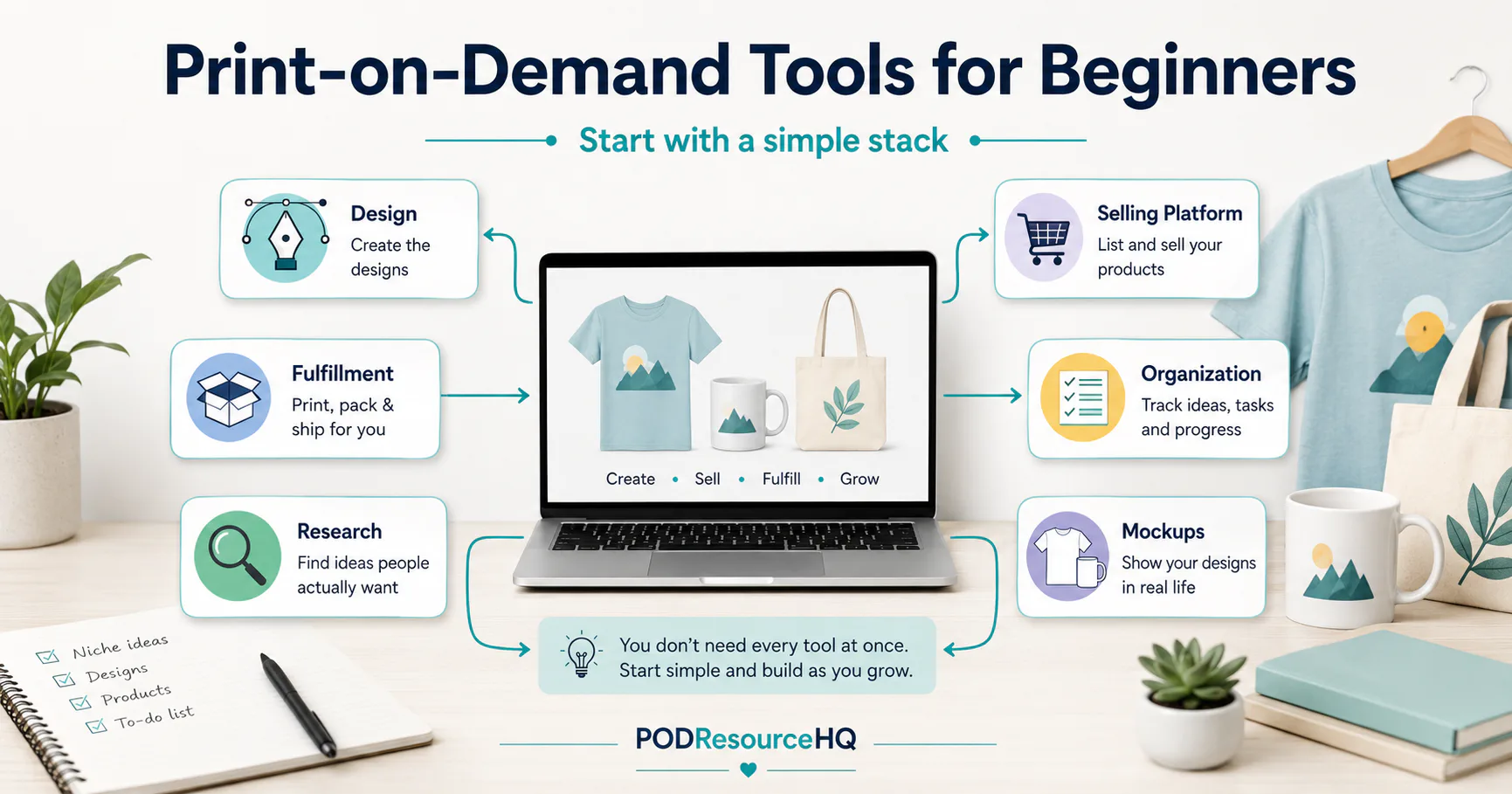
To start understanding print-on-demand, it helps to know what each type of tool does and where it fits in the basic workflow.
At a simple level, most beginners need:
- A way to create designs
- A print-on-demand provider to produce and ship products
- A selling platform where customers can buy
- A simple way to stay organized
- Optional research and mockup tools as they grow
This article breaks down the main tool categories so you can start with a practical setup instead of feeling like you need everything at once.
Who This Article Is For
This article is for print-on-demand beginners who are trying to figure out what tools they actually need before getting started.
It may be helpful if you are:
- New to print-on-demand
- Thinking about selling on Etsy, Amazon, Shopify, or another platform
- Comparing tools like Canva, Kittl, Printify, Printful, Gelato, or Gooten
- Feeling overwhelmed by too many software recommendations
- Trying to avoid spending money on tools before understanding the workflow
The goal is not to tell you there is one perfect setup.
The goal is to help you understand the basic tool categories so you can make calmer, more practical choices.
The Simple Print-on-Demand Tool Stack
Print-on-demand is easier to understand when you think of it as a workflow.
A basic POD workflow usually looks something like this:
- You create or prepare a design.
- You place that design on a product through a POD provider.
- You create a product listing on a selling platform.
- A customer places an order.
- The POD provider produces and ships the product.
- You track your products, listings, ideas, and costs.
Each tool has a job.
A design tool helps you create artwork.
A fulfillment provider helps produce and ship the item.
A selling platform gives customers a place to buy.
A research tool may help you understand keywords, products, or marketplace trends.
An organization tool helps you keep everything from becoming messy.
Once you understand those categories, POD tools become much easier to sort through.
Design Tools
Design tools are used to create artwork, graphics, product designs, listing images, and sometimes mockups for your products.
Common beginner-friendly design tools include:
- Canva
- Kittl
Canva may be useful for simple graphics, listing images, social media visuals, and beginner-friendly design work.
Kittl may be useful for typography-heavy designs, templates, graphics, and POD-style artwork.
The important thing to remember is that design tools are not the same as POD providers. They help you create the design, but they do not usually handle product production and shipping by themselves.
A Note About Licensing
Before selling designs made with any design tool, check the tool’s current commercial-use rules.
This matters because not every asset, template, font, or graphic can automatically be used on products for sale in the same way.
Canva and Kittl both have licensing rules that beginners should review before using designs commercially. Kittl’s free plan has also been noted as personal-use only, so sellers should verify their plan and licensing before selling products made with Kittl designs.
A safe beginner habit is to ask:
Am I allowed to use this design commercially on products I plan to sell?
If you are not sure, check the official license page for the tool before publishing the product.
Internal link placeholder: Canva Review
Internal link placeholder: Kittl Review
Print-on-Demand Fulfillment Providers
A print-on-demand fulfillment provider is the company that helps produce and ship the physical product after an order is placed.
Examples include:
- Printify
- Printful
- Gelato
- Gooten
These tools help connect your designs to products such as shirts, mugs, tote bags, posters, and other printable items.
The exact products, pricing, integrations, shipping options, and production details can vary by provider, so it is best to review each one individually before choosing.
A fulfillment provider can help with production and shipping, but it does not guarantee that your products will sell.
You still need to create products people may want, write useful listings, follow marketplace rules, and manage your shop carefully.
Internal link placeholder: Printify Review
Internal link placeholder: Printful Review
Internal link placeholder: Gelato Review
Internal link placeholder: Gooten Review
Selling Platforms
A selling platform is where customers view and buy your products.
Common selling platforms may include:
- Etsy
- Shopify
- Amazon
- TikTok Shop
- eBay
Each platform works differently.
Etsy is commonly used by handmade, vintage, and creative sellers, but sellers using POD providers need to understand Etsy’s production partner rules.
Shopify is often used by sellers who want their own ecommerce storefront, but it usually requires more setup and traffic-building than simply listing on a marketplace.
Amazon, TikTok Shop, and eBay may also be options, but each has its own rules, requirements, fees, and limitations.
For beginners, it is usually better to understand one selling platform before trying to launch everywhere at once.
Trying to manage too many platforms too early can create confusion, duplicate work, and more places where mistakes can happen.
Research Tools
Research tools can help with product ideas, keywords, marketplace data, listing analysis, and competition research.
Examples include:
- eRank
- EverBee
- Marmalead
- EtsyHunt
These tools may be useful, especially for Etsy sellers, but they are not magic.
A research tool can help you look at keywords, listings, trends, or product ideas. It cannot guarantee demand, sales, or success.
Beginners sometimes make the mistake of thinking they need several research tools before they can create anything.
In reality, it may be better to learn the basic POD workflow first, then add research tools when you understand what problem you are trying to solve.
For example, a research tool may become more useful when you are trying to improve listing titles, compare product ideas, or study a specific niche.
But you do not need to subscribe to every research tool before creating your first few practice listings.
Organization Tools
Organization tools are easy to overlook, but they can make a big difference.
Print-on-demand involves more moving parts than many beginners expect.
You may need to track:
- Product ideas
- Design files
- Product types
- Fulfillment providers
- Listing titles
- Keywords
- Costs
- Publishing status
- Notes about what needs fixing
- Links to live listings
Simple organization tools include:
- Google Sheets
- Airtable
- Notion
- Trello
- A basic spreadsheet
You do not need a complicated system to start.
A simple spreadsheet with columns for product idea, design status, listing status, platform, provider, and notes may be enough in the beginning.
The main goal is to avoid losing track of what you created, where you uploaded it, and what still needs work.
Mockup and Listing Support Tools
Mockups help show what a product may look like when printed.
For example, a mockup may show your design on a t-shirt, mug, tote bag, sweatshirt, or wall art print.
Some POD providers include basic mockups. Design tools like Canva or Kittl may also help create listing graphics or promotional images.
Mockup tools can be helpful, but beginners do not need to overdo this right away.
The most important thing is that your product images are clear, honest, and easy to understand.
Avoid using mockups that make the product look misleading or unrealistic. Customers should be able to understand what they are buying.
What You Do Not Need Right Away
A beginner POD setup does not need to include every tool available.
In most cases, you probably do not need all of these on day one:
- Multiple paid design tools
- Multiple POD providers
- Every Etsy research tool
- Advanced automation software
- A complicated dashboard
- Paid ads before understanding the workflow
- Several selling platforms at the same time
- A huge library of mockup tools
More tools can sometimes create more confusion.
A better approach is to start with the smallest tool stack that helps you understand the process.
Then add tools only when they solve a real problem.
For example, if your designs are hard to create, a better design tool may help.
If you are struggling to track your listings, a spreadsheet may help.
If you are unsure what keywords buyers use, a research tool may help.
But buying tools before understanding the workflow can lead to wasted time and money.
A Simple Beginner Setup Example
A simple beginner setup might look like this:
- One design tool
- One POD fulfillment provider
- One selling platform
- One spreadsheet or simple tracker
- Optional research tool later
For example, a beginner might use a design tool to create artwork, connect that design to a POD provider, list the product on one selling platform, and track everything in a spreadsheet.
That does not mean this is the best setup for everyone.
It simply shows that you do not need a large stack of tools to understand how POD works.
Start simple.
Learn the workflow.
Then upgrade only when there is a clear reason.
Common Beginner Mistakes to Avoid
Thinking You Need Every Tool Immediately
It is easy to believe you need every popular design tool, POD provider, research platform, mockup app, and automation tool before you can start.
You do not.
Start with the basics first.
Confusing Tool Categories
A design tool does not fulfill orders.
A POD provider does not automatically bring customers.
A selling platform does not create designs for you.
A research tool does not guarantee sales.
Each tool has a different job.
Understanding those jobs helps you avoid choosing tools for the wrong reason.
Ignoring Licensing Rules
Before selling products with designs made in Canva, Kittl, or any other design tool, review the current licensing rules.
Do not assume that every template, font, graphic, or image is automatically safe to sell on physical products.
Ignoring Marketplace Rules
Marketplaces have their own rules.
For example, Etsy sellers using outside production partners should review Etsy’s production partner requirements.
Other platforms may have their own rules for product listings, seller accounts, fees, intellectual property, shipping, and customer service.
Always verify rules on the official platform website before publishing products.
Assuming Free to Start Means No Expenses
Print-on-demand can reduce the need to buy inventory upfront, but it does not remove every cost.
Possible expenses may include:
- Product costs
- Shipping costs
- Marketplace fees
- Payment processing fees
- Listing fees
- Taxes where applicable
- Samples
- Design tool subscriptions
- Research tool subscriptions
- Advertising, if used
You do not need to panic about every possible expense, but you should understand that no inventory does not mean no costs.
Using Too Many Platforms at Once
Trying to sell on Etsy, Shopify, Amazon, TikTok Shop, and eBay all at once can become overwhelming.
Each platform has different rules, listing steps, fees, and customer expectations.
Most beginners are better off learning one workflow clearly before expanding.
So, What Tools Do You Actually Need?
To start print-on-demand as a beginner, you usually need a simple tool stack:
- A design tool to create your artwork
- A POD provider to produce and ship products
- A selling platform where customers can buy
- A simple organization system to track your work
- Optional research or mockup tools when needed
You do not need every tool right away.
You do not need the most expensive setup.
You do not need to build a complicated system before you understand the basics.
The best starting point is the simplest setup that helps you learn the workflow and make steady progress.
Final Recommendation
Start with one tool in each main category.
Choose one design tool, one fulfillment provider, one selling platform, and one simple tracker.
Then create a small, manageable workflow before adding more tools.
As you learn what slows you down, you can decide whether another tool would actually help.
Internal link placeholder: POD Resources Page
Internal link placeholder: How to Start Print-on-Demand as a Beginner
Simple Next Step
If you are still sorting through your options, start by listing the tools you are already considering under these categories:
- Design
- Fulfillment
- Selling platform
- Research
- Organization
- Mockups and listing support
Then choose the simplest setup that helps you take the next step without overcomplicating the process.
For more beginner-friendly tool breakdowns, visit the POD Resources page and compare tools by category.
Affiliate disclosure note
Some links in this article may be affiliate links. If you choose to purchase through one of these links, PODResourceHQ may earn a commission at no additional cost to you. This helps support the site. Affiliate relationships do not influence our reviews — always verify current details on the official website before making a decision.
Related resources
INTERNAL LINKS TO ADD
How to Start Print-on-Demand as a Beginner
POD Resources Page
Canva Review
Kittl Review
Printify Review
Printful Review
Gelato Review
Gooten Review
eRank Review
RELATED RESOURCES
How to Start Print-on-Demand as a Beginner: /blog/how-to-start-print-on-demand
POD Resources Page: MISSING — confirm URL slug
Canva Review: /canva-review
Kittl Review: /kittl-review
Printify Review: /printify-review
Printful Review: /printful-review
Gelato Review: /gelato-review
Gooten Review: /gooten-review
eRank Review: /erank-review
EverBee Review: MISSING — placeholder link, create later
Marmalead Review: MISSING — placeholder link, create later
EtsyHunt Review: MISSING — placeholder link, create later
Commercial Licensing Guide: MISSING — placeholder link, create later
Mockup Tools for POD Sellers: MISSING — placeholder link, create later
Etsy POD Keyword Research Guide: MISSING — placeholder link, create later
Simple POD Tracking Spreadsheet: MISSING — placeholder link, create later
Best Research Tools for Etsy POD Sellers: MISSING — placeholder link, create later
For more beginner-friendly tool breakdowns, visit the POD Resources page and compare tools by category.